

| Standing screen display size | 10.3 Inches |
|---|---|
| Screen Resolution | B/W: 2480 x 1860 (300 ppi) |
| Max Screen Resolution | 2480*1860 300PPI Pixels Per Inch |
| Wireless Type | 802.11ac |
| Average Battery Life (in hours) | 1 days |




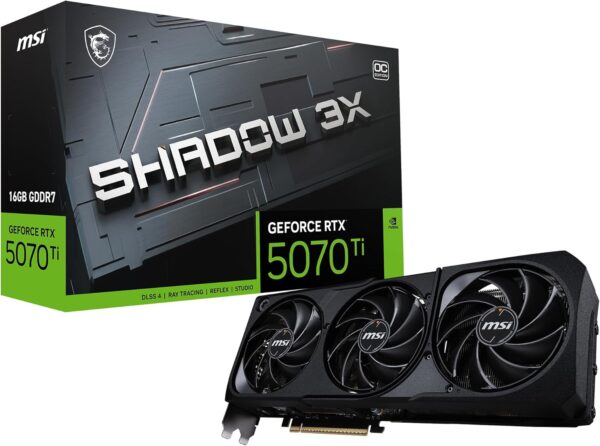
MSI Gaming RTX 5070 TI 16G Shadow 3X OC Graphics Card (16GB GDDR7, 256-bit, Extreme Performance: 2497 MHz, DisplayPort x3 2.1a, HDMI 2.1b, NVIDIA Blackwell Architecture)
Original price was: $1,100.$840Current price is: $840.
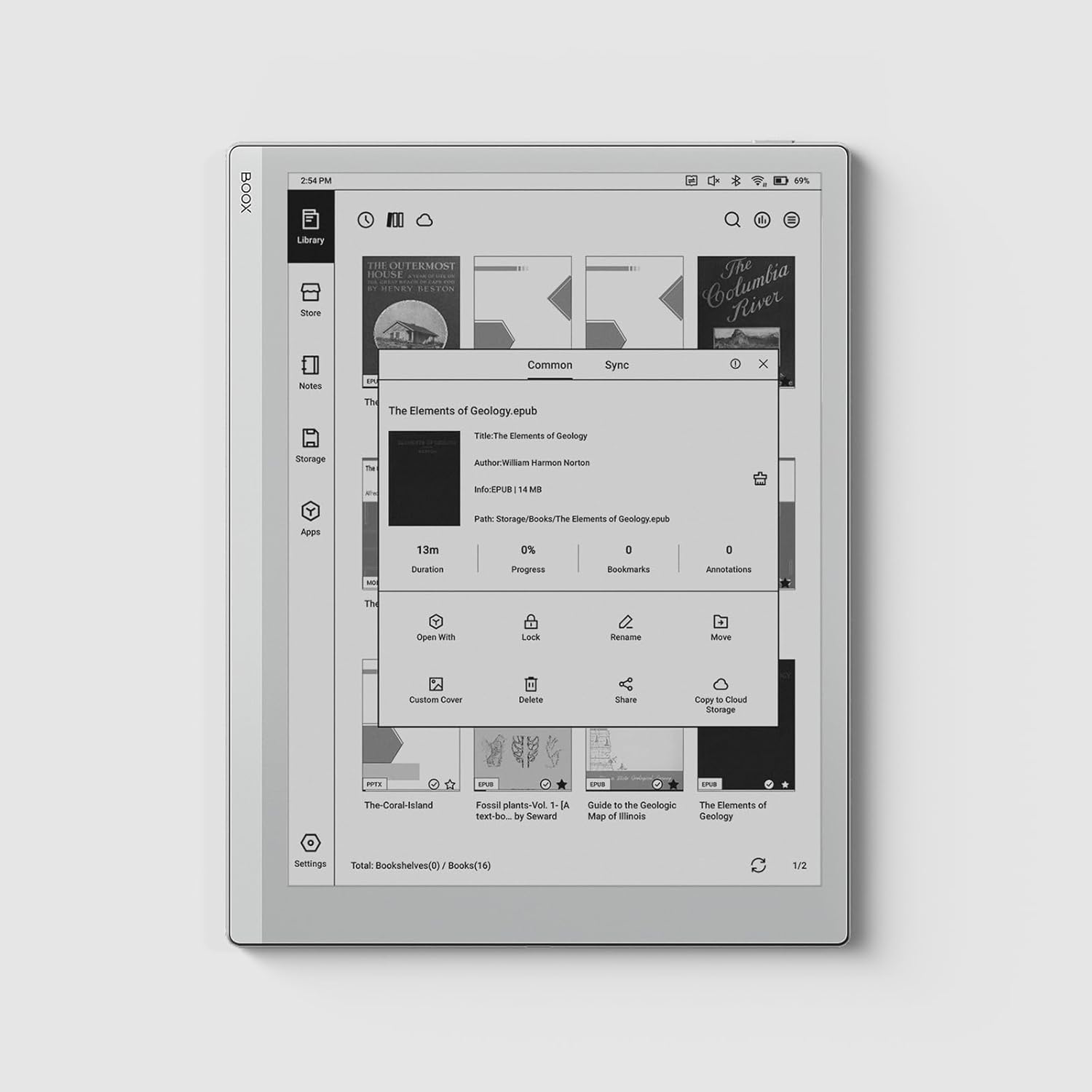
BOOX Tablet Go 10.3 ePaper E Ink Tablet No Front Light 4G 64G 300 PPI B/W
$400
Report Abuse
Description
Product Description:
From the brand
Screen: 10.3″ HD Carta 1200 glass screen with flat cover-lens Resolution: 2480×1860 (300 ppi) Touch: BOOX stylus touch (4,096 levels of pressure sensitivity) + capacitive touch CPU: 2.4Ghz Octa-core RAM: 4GB ROM: 64GB Connectivity: Wi-Fi (2.4GHz + 5GHz) + BT 5.0 G-sensor for Auto Rotation No Front Light
OS: Android 12 Document Formats: PDF, CAJ, DJVU, CBR, CBZ, EPUB, AZW3, MOBI, TXT, DOC, DOCX, FB2, CHM, RTF, HTML, ZIP, PRC, PPT, PPTX, EPUB3 Image Formats: PNG, JPG, BMP, TIFF Audio Formats: WAV, MP3 Supports 3rd-party apps
Button: Power Button USB-C Port (Supports OTG or use as an audio jack) Built-in Dual Speakers Built-in Microphone Battery: 3,700mAh Li-ion Polymer Dimensions: 235*183*4.6mm (9.3″ x 7.2″ x 0.18″) Weight: Approx. 375g (13.2oz)
Product Summary:
Item Details:
Additional Information
| ASIN | B0D4DFT3W3 |
|---|---|
| Customer Reviews |
4.0 out of 5 stars |
| Best Sellers Rank |
|
| Date First Available | June 10, 2024 |
Warranty & Support
Product Warranty: For warranty information about this product, please click here
Products Reviews:
Reviewer: Greg
Rating: 5.0 out of 5 stars
Title: Perfect fit for my needs
Review: I’m not a new to digitizer tablets, but this is my first E-Ink notepad (I’ve used multiple Samsung Galaxy tablets, the Surface Pro 2 back in the day, even the Palm C waaay back). I went down a deep rabbit hole before I finally decided on the Boox Go.My criteria were (1) really good writing experience, (2) Microsoft productivity apps OneNote, OneDrive, and Loop (don’t judge, they’re what we have at work), and (3) a lightweight e-reader with crisp text for my aging eyes. I went back and forth about the absence of lighting, but it was finally the writing experience that sold me. That’s the killer feature…the notes app. It is really low latency, and the E-ink Carta is so close to the nib that it really does get closer to a pen and paper feel than anything else I’ve seen.I have been using it as a work tablet for 3 weeks now as a primary note taker, and it has been a very good experience. Previously, on LED screen devices, I found that my handwriting (not good to begin with) degraded to the point of useless illegibility… Not so here. This thing actually improves my note taking. It’s almost as good as carrying a large hardcover journal., but without the bulk of a…large hardcover journal.It’s amazingly thin and light, while remaining very stiff (I, as some other users I saw online, could not bend it).I also just finished a two day seminar wherein I used the native Neo Reader to view and annotate PDFs. The same accuracy and responsiveness as the Notes app is found here, though I found the toggle between full screen and pinch to zoom a bit clunky. Like a lot of other functions, the BOOX design goes more ‘power user’ by favoring a lot of low level functionality tweaks over a short learning curve. I mention that because it does get a little hard on my older eyes to read letter sized PDFs full page format.I have also used OneNote and OneDrive’s built in PDF annotator. There is a significant tradeoff here, in that pen responsiveness is much poorer, though functionality is all there. As this wasn’t the greatest writing experience, I ended up using the native Notes app and enabling a clever feature which automatically saves a PDF version of the entire notebook to a location of your choice. Good enough for my needs.Another nice feature of the app manager is that you can easily set up work and personal configurations of most apps. This enables a separate app icon for, say, two OneDrive accounts. It makes for a basic but usable work profile.Libby (download from Play Store) works just fine. Text is very clear, though I couldn’t disable the swipe animations (which trigger a full screen refresh every time). There is a simple workaround, though, and that’s navigating by tapping the left or right margin, just like the old Barnes and Noble Nook.I don’t use the Onyx account at all. This is a hybrid work device, and I’m as careful as I can be as to where my work data is stored. I would rather lose my notes than have them fall into the wrong hands, and frankly, I wasn’t able to get the level of trust I needed to store anything in the Onyx cloud.One last thing, and this isn’t really the Go’s issue, but some of the third party cases have magnets in them which tended to distort the digitizer response, especially in the corners. It looks like a defect in the screen, with the pen line not tracking the nib location, but it disappears when you remove the cover. Just something to be aware of.All in all, I am very happy with this device!
Reviewer: glvr1
Rating: 5.0 out of 5 stars
Title: Specific use: migraine and eye strain
Review: I love this thing way more than I anticipated. I was really leery of the price, and it’s not like I don’t already own tablets and other form of eink devices.I bought this specific device for some very specific reasons, the #1 reason being my daily migraines.I have had daily migraine for…uh, going on 5 years now. Professionally, I am a data analyst. If you’re unfamiliar with either, migraines don’t tend to respond well to light, color, noise or movement. While I can often avoid the latter two, the first two are essential to my job functions – typically a minimum of 8 hours per day. And by the end of the day, even scrolling text can be too much stimulation.And my favorite pasttime is reading online. 🫠So I have done all the things. I have adjusted lighting. I have tried different colored glasses and migraine specific glasses. I have used blue light filters and Dark mode and Sepia mode adjustments. And so on. I also now use eink as much as possible.I originally read some research and testimonials regarding the comparative benefits of eink for eye strain, vertigo, and migraines. Since I have all 3, I gave it a go. I started with a Kobo Touch Lux 5, and within a few months upgraded to the Onyx Boox Tab C series (both mini and full size). If I’m not working on a computer, I’m generally on an eink tablet. I spend easily most of my non-work hours using eink. It’s been a lifesaver.I was never very interested in the note taking functions, and despite the keyboard that comes with the full size Tab C, Boox are NOT very typing friendly. At all.So why did I get the Boox Go? And why do I LOVE IT so much?Here’s what I was going for:Over time, I noticed how much darker the Color eink screen is. In general, it actually causes a little extra eye strain just because the text is always so dark. So I kept turning on the front light and adjusting the color settings, but it still felt like more strain than necessary. I double checked by returning briefly to my Touch Lux 5, which is entirely black and white – the visual difference in text readability is actually astonishing. I do still use my Tab C devices when I need color or additional screens, but the Go is now my go-to. 🙃My migraines have been steadily worsening long term. A year ago, the Boox Tab C was perfect for my needs. Now, I find I’m a little too sensitive to use it as frequently.Here is what I did not expect:One feature of the Go 10.3 is that there is no front light. This means that there is one less screen between you and the device. It’s very thin, but the difference was astonishing. Notetaking abruptly changed from “ok, doable” to “this is easier than reaching for post-it notes!” The difference in writing quality cannot be understated.Honestly, my paper note taking has dropped by about 30% overall. And so has my whiteboard use. (This is a good thing.)Other general review notes:The Boox Tab stylus works on this device as well, so now I have backups! 👍This is a fully functioning tablet with full internet and app capabilities, using Android OS. So it’s almost exactly like my smartphone, with more limited communication ability.Boox customer service has kind of a bad reputation (at least in the US), which is why I made this purchase through Amazon, in case it didn’t work out.The battery lasts me at minimum the full day, even if I read all day during the weekend. More battery is consumed if I play games (I do word scrambles), or if I surf the a lot.The Boox Super Refresh Rate was a key buying point. It’s one of the big pluses for the Tab C series. It reduces ghosting and keeps the text crisp and easy to read. I LOVE BSR.One note:I am 3 months into using this device and I have begun to notice some issues. The problem is that I’m not sure if it’s my migraines worsening again or something with the device. I have been having a little more difficulty seeing the text as clearly. I’ll be doing 2 things to test it, and will update this review once they’re complete:1. It may be my eyes. I’ll go do a vision test next week in case my glasses need adjusting.2. I download a LOT of online books. It may have slowed the processor, which may have impacted the Boox Super Refresh speed. I’m going to try putting in a large microSD card and moving all my downloaded material there and off my Go. Then we can see if the screen refresh improves.If it’s neither, I’ll bug customer support, but I’m hoping it’s the second. Will update once I confirm one way or another!
Reviewer: O. AK
Rating: 5.0 out of 5 stars
Title:
Review: If you are a paper person like me, that is what you are looking for. Color is not something is miss as well as the backlight. Everything is just same as my paper notebook but smarter. To be able to work on pdf docs without printing is a game changer.
Reviewer: Stefano Dallatana
Rating: 5.0 out of 5 stars
Title:
Review: Bellissimo nel design bello sottile e leggero, dotato di penna base ma funzionale, perfetto per prendere appunti e note su ogni tipo di foglio, molto valido per leggere, batteria che si scarica difficilmente e ottima la possibilità di sfruttare android e quindi lo store per scaricare app, buone anche le casse incorporate. Installato amazon music, kindle, rakuten, codycross, outlook ecc.
Reviewer: Mark Avey
Rating: 5.0 out of 5 stars
Title:
Review: I’m heavily invested in the Apple ecosystem and come from a Remarkable 2, so I appreciate quality kit, and the Boox Go 10.3 is absolutely gorgeous. It’s a beautiful device to hold and use – the build quality is outstanding.The feeling of writing is super important to me for a device like this. The Remarkable 2 was the best I’d tried so far, but this device equals it. I did find the supplied pen to be a little “scratchy”, but it’s grown on me. I can also use the Staedtler pen I’d bought to use with the Remarkable for a smoother writing experience.I decided to sell the Remarkable and switch to the Boox as my primary note-taker. The Notes app in the Boox has a lot more functionality than the Remarkable. In addition and of most importance to me was the ability to download other apps on the Google store. So I can now use this fabulous eInk device for more of my reading, including my RSS feeds, Pocket articles, magazines with Libby, and of course eBooks which I’m using with KOReader.This is probably my favourite device this year and allows me to do a lot more reading on eInk and distraction-free.I don’t miss the front-light. My use is either outdoors or indoors under lighting and I’ve not had a situation yet where I couldn’t use the device due to lack of lighting.You don’t get the “free” case when ordering from Amazon, but most reviews of that I’ve seen aren’t particularly positive, so no great loss. I purchased a sleeve case for now until such time as third-party flip covers come out.
Reviewer: محمو
Rating: 3.0 out of 5 stars
Title:
Review: تم إرجاع المنتج من تاريخ ٢٨/١ والي الان لم يتم رد المبلغ ..
Reviewer: P.
Rating: 5.0 out of 5 stars
Title:
Review: Der E-Reader ist top. Ich hatte bisher einen 8″ Kobo Sage. Der Sprung auf 10.3″ ist noch mal beachtlich. Der Akku hält hier 10x so lang wie bei meinem Kobo, das (etwas an E-Reader angepasste) Android ist komplett offen – es lassen sich alle Apps aus dem Playstore oder auch APK installieren. Ja, es hat keine Hintergrundbeleuchtung – aber dafür fällt eine Displayschicht weg, weshalb das Bild noch direkter auf dem Screen erscheint. Im Gegensatz zum Kobo ist auch der Hintergrund angenehm weiß/grau, nicht mit einem üblichen Grünstich wie viele Andere.Obwohl der Reader quasi so dünn ist wie ein USB-C Port gibt nichts nach, trotz der Größe wirkt es sehr stabil. Die generelle Verarbeitungsqualität ist bei meinem erhaltenen Modlel definitiv sehr wertig, obwohl es einer der günstigsten Reader im 10″-Bereich ist.Die Größe ist auch perfekt, um viele PDF-Magazine ohne extra Zoom lesen zu können (ich nutze Koreader mit automatischen crop).
Questions & Answers
Loading...
More Products




Product Enquiry